Platform Effect Indicator brings clear platform cues to Engineers
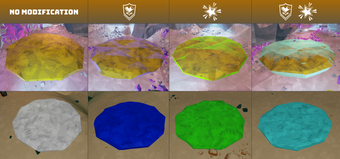
Platform Effect Indicator, by iDRG for Windows, marks Engineer platforms so players can identify upgraded surfaces quickly. The mod displays platform status during missions, giving players visual reference to choose safe landing spots and influence enemy pathing. Key points include customization options and support for both single- and combined-upgrade visuals. This tool targets Deep Rock Galactic players who rely on platform tactics and who value faster decision making in chaotic encounters.
What the mod does inside a run
In missions the mod makes upgrade states legible by assigning distinct visual cues to platform properties. It identifies platforms upgraded with Plastcrete MKII, which reduces fall damage, and those with Repellent Additive, which alters bug pathing. The display differentiates platforms that have both upgrades simultaneously, so players can pick landing points or bait enemy movement with confidence rather than guessing from memory during firefights.
How it affects teammates and multiplayer play
Inside a squad the mod runs only on the installing client's side, so other players do not see the indicators unless they install the same mod. That design keeps game balance intact while changing only the installing player's tactical window. Because the visual cues do not alter mechanics, the mod does not interfere with mission objectives, letting the installing player make safer movement choices without changing enemy behaviour for others.
How the indicators look and how you change them
In the field the mod offers selectable appearance modes to suit different visibility needs. Options include a subtle shimmer for less visual contrast and solid colors for maximum clarity, letting players trade immersion for rapid legibility. Dual-indicator support uses discrete visual layers when a platform carries both upgrades. The configuration is presented as simple toggles so players can adjust looks before or between missions.
Learning curve, replay value, and modding fit
Onboarding is brief since there are no new controls or progression systems to master; enable the mod and the visuals appear on platforms. The change affects tactical decisions rather than long-term unlocks, so replay value comes from improved platform-based strategies in varied mission types. The mod pairs well with other quality-of-life utilities by the same author and suits players who prioritise clearer tactical information over HUD clutter.
A practical, community-endorsed upgrade for platform-focused players
The mod is a pragmatic pick for Engineers and squad members who base strategies around platform placement, backed by its frequent recommendation across community lists. One consideration is that installation requires linking your account through the game's mod service before use. For players who accept that setup step, this tool is a concise way to reduce guesswork and sharpen split-second movement choices in hectic missions.